How to read a script on camera without it showing
You can always see the moment the eyes drop to the notes. Here is how to read a script on camera while keeping your gaze on the lens, and how to write it.

Photo and video
Cue
Cue is an iPhone teleprompter app that holds the script under the lens, measures your real speaking rate to set the scroll, and rewrites the text for the voice.
The full prompter, unlimited takes, the four formats and the speed test are free. Cue Pro unlocks the writing assistant, 4K capture, 60 frames per second and the glass format, at €4.99 a month or €34.99 a year.
123 WPM
your real speaking rate, measured, with the scroll set to match
4 formats
Reel, YouTube, speech, glass, each one sets everything at once
0 accounts
nothing to create, scripts and takes stay on the iPhone
01 The starting point
There are two ways to film yourself saying something. Learn it by heart, and spend half an hour on forty seconds of video. Or read your notes off to the side, and deliver a take where your eyes leave the lens on every sentence. Everyone sees it, even without being able to say why.
A teleprompter fixes that by holding the text just under the lens. It is an old principle, there is nothing original about it, and it works.
Where existing prompters stop is the text itself. They scroll whatever you give them, at whatever speed you guessed. The two things Cue adds are aimed at exactly that.
The problem is almost never the equipment. It is the text, and the speed it goes past at.
02 The prompter
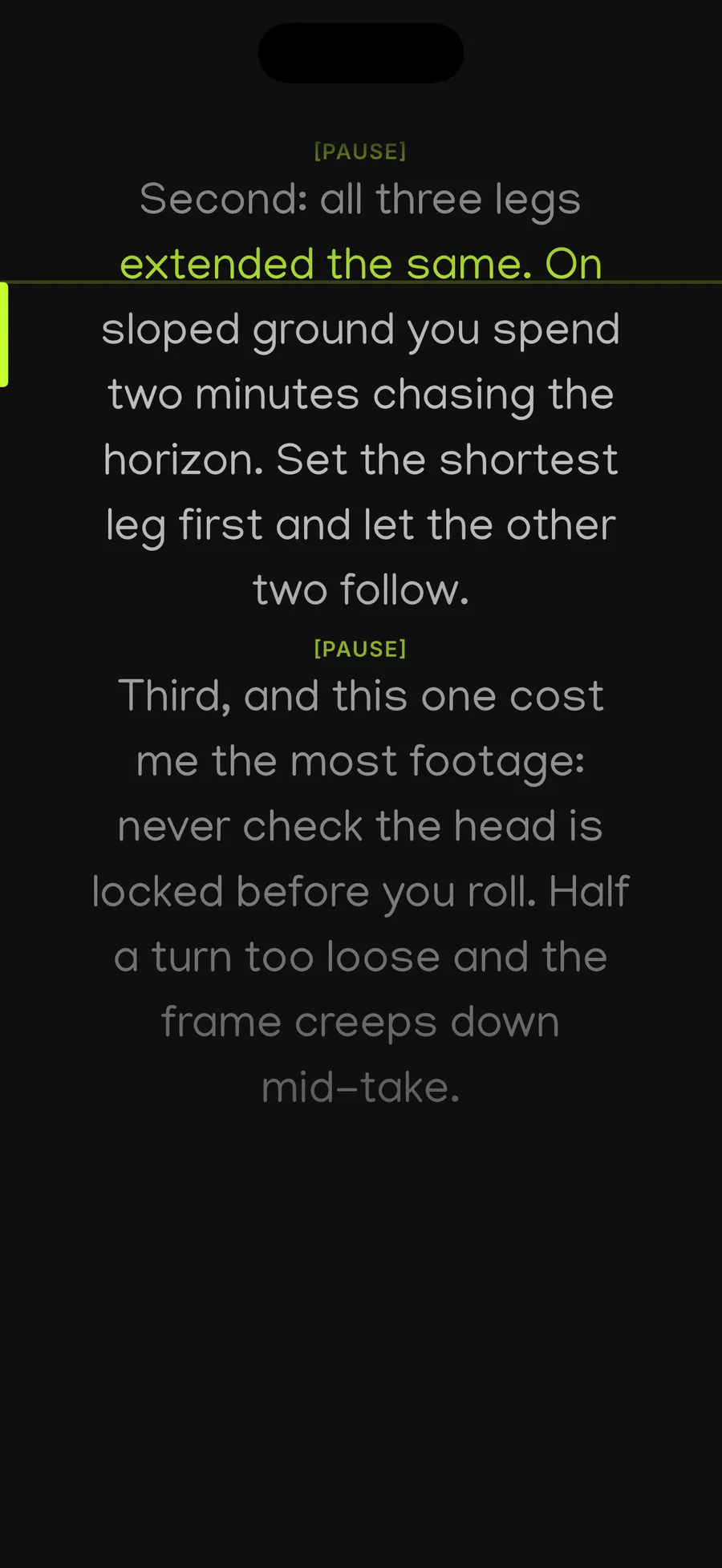
The text scrolls in portrait or in 16:9, at the speed you choose, with adjustable size, margin and contrast. A green line marks the one you are saying, and that is what separates reading a wall of text from knowing where you are.
Pause markers appear as they are in the scroll. It is a silly convention and a terribly effective one: you write a breath into the script, and you honour it on the take.
Pause, resume and stop sit under your thumb at the bottom of the screen, so you never have to look away from the camera mid-sentence. Front or rear camera, a countdown and multiple takes follow, and every recording stays filed with the script that produced it.
03 The speed
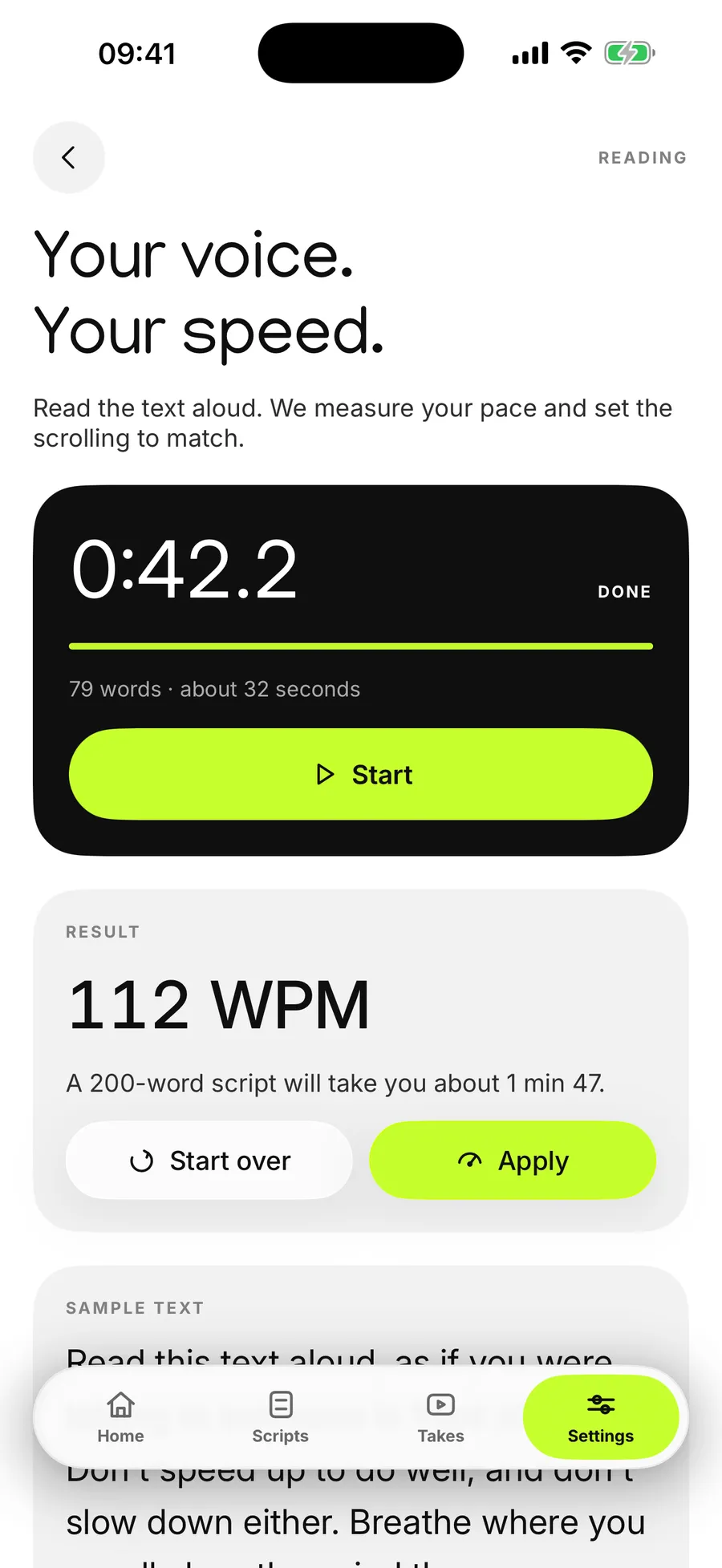
This is the feature I am happiest with, and it is also the dumbest. You read a reference passage aloud for about thirty seconds. Cue counts, and derives your real pace in words per minute.
In the screenshot, 123 words per minute. From there the app knows that a 200 word script will take you one minute thirty-eight, and sets the scroll to match instead of leaving you to guess at a slider.
None of the prompters I looked at do this. They all offer a speed setting, none of them calculate it from you. And yet it is the number one cause of ruined takes: the text runs away from the second sentence, you speed up to catch it, and your voice goes mechanical.
A speed set by ear is a wrong speed. Thirty seconds of measurement beats a slider.
04 The assistant
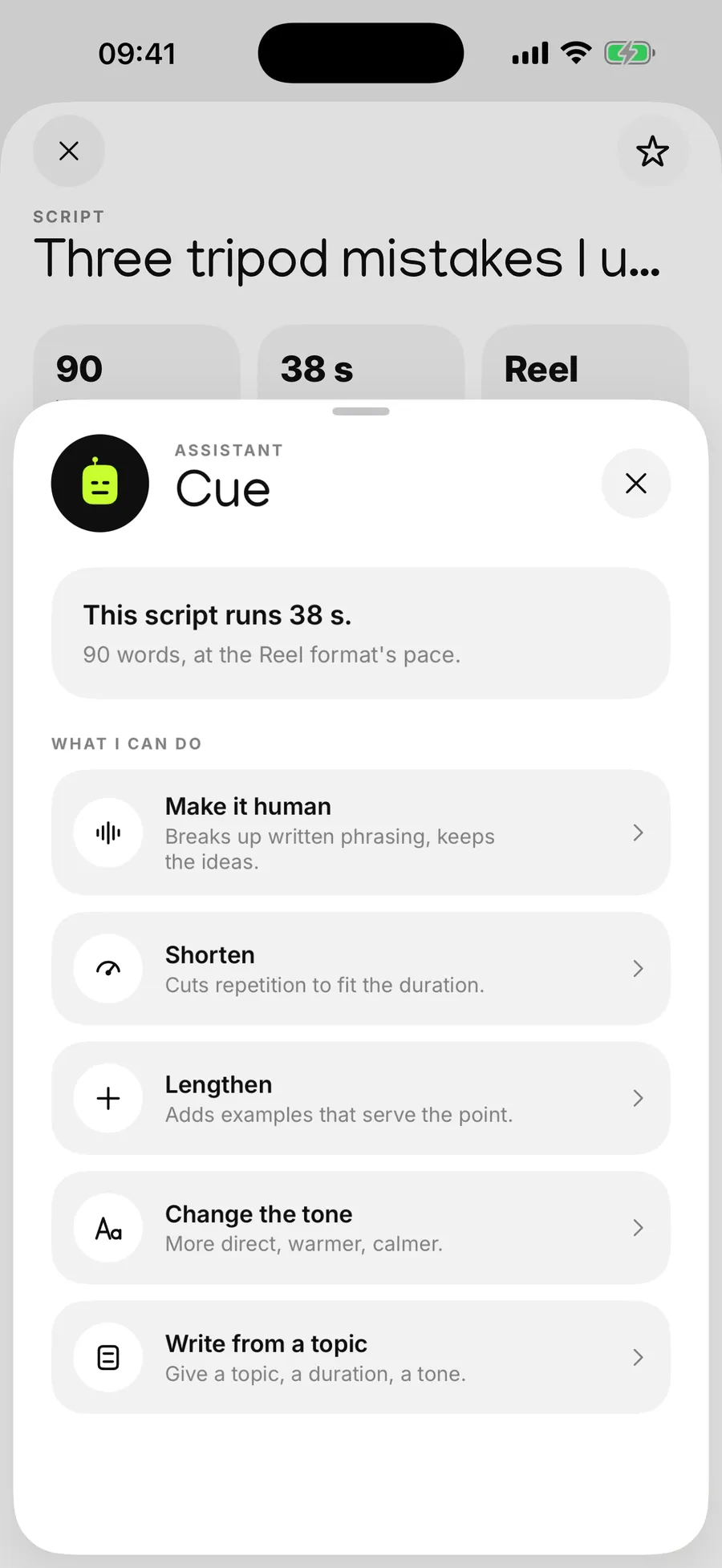
A well-written text and a text that says itself out loud are not the same text. The first has subordinate clauses, asides and words nobody ever pronounces. The second has short sentences and places to breathe.
The assistant works on that gap. It shortens when the script runs over the target length, lengthens when you are a minute short, changes the tone, breaks the text into paragraphs you can read aloud, and can write a first draft from a topic, a duration and a tone.
It always states the duration before and after, because that is the only measurement that matters when you write for video. In the screenshot, 98 words, 41 seconds, at the pace of the Reel format.
This is the part that needs a server. The script text is sent there to be processed when you ask for a rewrite, and nothing else leaves the iPhone. A button in the settings erases everything, on the device and on the server side.
05 The formats
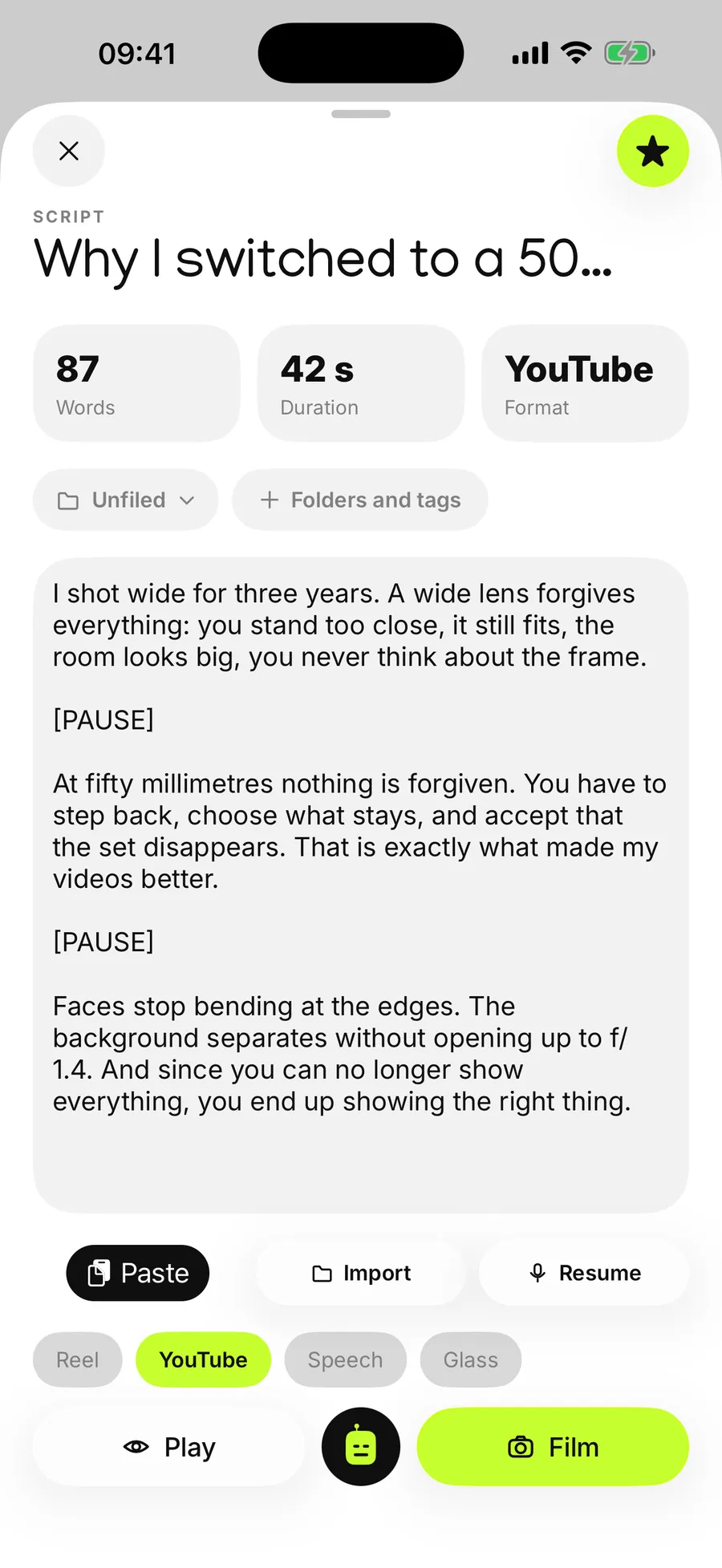
A Reel doesn't read like a speech, and a speech isn't filmed like a YouTube video. Rather than making you set the speed, the frame, the mirroring and the camera separately every time, Cue turns them into four buttons: Reel, YouTube, speech, glass.
The glass format is the one for mirror prompters, those half-silvered plates you mount in front of a lens. The image is flipped so it reads correctly in the reflection.
The editor permanently shows the word count, the duration estimated at your rate and the chosen format. You import text from PDF, Word, Pages, RTF, TXT, Markdown or EPUB, or you paste it, or you dictate it.
06 The library
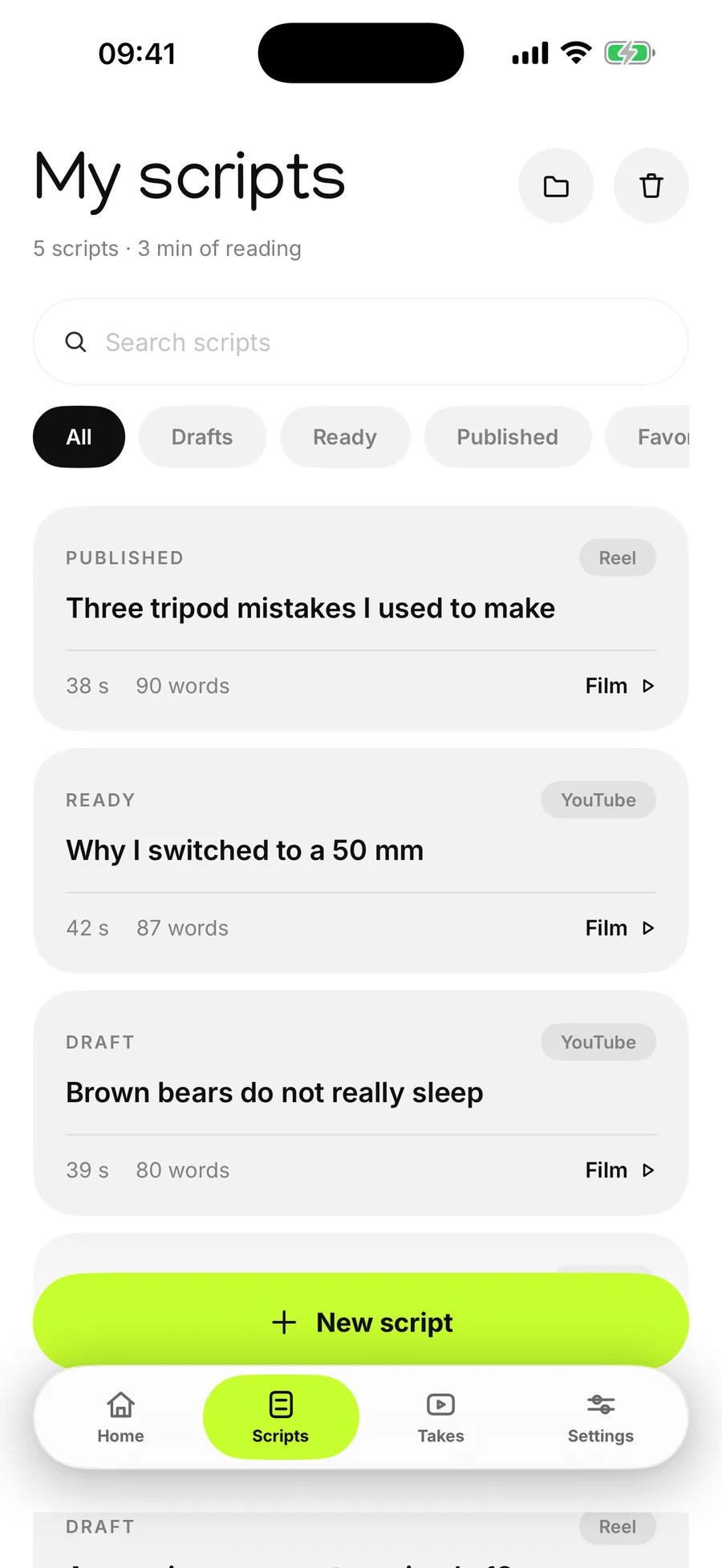
Unlimited scripts, folders, tags, and three statuses that are enough: draft, ready, published. A bin for the things you delete without being sure.
Every script shows its duration and word count in the list, which saves opening six of them to find the one that fits the minute you have.
Takes stay attached to the script that produced them. Six months later, finding the video means finding the text, which is a great deal easier.
The rest of the text fades back. You always know where you are, even after a blank.
Thirty seconds of reading gives your real pace, and the scroll is set to match.
Every recording is filed with the text that produced it, with no sorting to do.
PDF, Word, Pages, RTF, TXT, Markdown and EPUB, on top of pasting and dictation.
Cue does not make subtitles and does not transcribe your videos. That is what most prompter apps do, and they do it well. The bet here is elsewhere: the text before the take, rather than the dressing afterwards.
Cue does not write for you either, whatever the word assistant suggests. It reworks what you put down, or produces a first draft you are going to rewrite. A generated script read out as-is is audible within three seconds, and nobody wants to watch that.
Finally, Cue does not edit. Takes come out raw, in 4K if you subscribe, and go straight into whatever editing tool you already use.
Cue isn’t on the App Store yet. The listing is written, the subscriptions are configured, and what’s left is the submission.
It speaks French and English, and switches itself according to the iPhone’s language. This page will be updated on release day, with the download link where this sentence is.
Without the assistant, Cue contacts no server at all. What stays on the iPhone, the exact route a text handed to the assistant travels, and what the relay keeps, which is none of your text, are set out in the Cue privacy policy. The rules of the service, what is free, what Pro unlocks and the legal notice are in the terms of use.
The text scrolls on screen while the iPhone records, right under the lens, so your eyes stay in line with the camera. A green line marks the one you are saying, and pause, resume and stop sit under your thumb at the bottom of the screen.
It measures your real speaking rate. You read a reference passage aloud for about thirty seconds, the app derives your pace in words per minute, then sets the scroll to match. That is what stops the text running away from the second sentence.
Shorten a script that runs long, lengthen it when you are a minute short, change the tone, break it into paragraphs you can read aloud, and write a first draft from a topic, a duration and a tone. It aims at a text that says itself, not a text that looks good on paper.
The full prompter, unlimited scripts and takes, front and rear camera, the four formats, the speed test and document import. Nothing is rationed out.
Cue Pro unlocks the writing assistant, 4K capture, 60 frames per second, audio clean-up, external display output and the glass format. It costs €4.99 a month or €34.99 a year, which works out at €2.92 a month.
No, they stay on the iPhone and there is no account to create. The one exception is the writing assistant, which needs to send the script text to a server in order to rewrite it. A button in the settings erases all the data, on the device and on the server side.
Yes. The glass format flips the image so it reads correctly in the reflection of a half-silvered plate, and the external display output lets you show the text somewhere other than the iPhone.
iOS 18 or later, on iPhone and on iPad.
Coming soon
Cue is coming very soon.